How to Draw Your Signature Online (Free & No App Required)
Learn how to draw your signature online for free using your mouse, touchpad, finger, or stylus. Then download it or use Fill to securely sign PDFs, contracts, and other documents from any device.
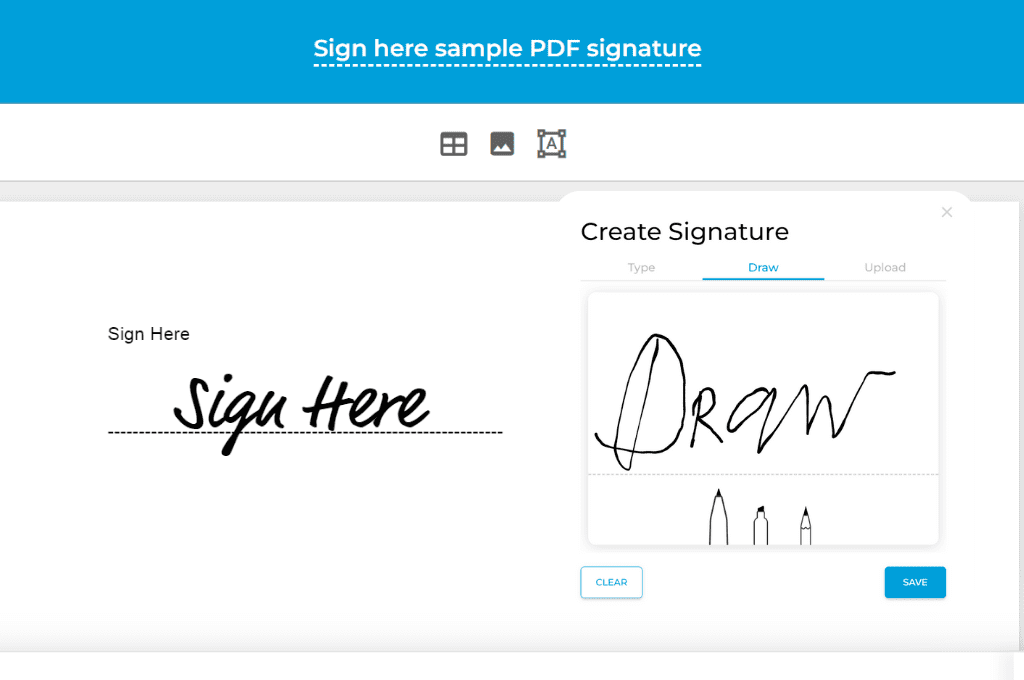
Need to draw your signature online? Whether you're signing a PDF, completing an online form, or approving a contract, you can create a handwritten electronic signature in just a few seconds using your mouse, touchpad, finger, or stylus—without printing or scanning documents.
In this guide, you'll learn how to draw your signature online, save it for future use, and use it to sign documents from any desktop or mobile device.

What Is a Drawn Electronic Signature?
An electronic signature is a digital representation of your intent to sign a document or approve an agreement. One common type is a drawn electronic signature, which lets you sign using your mouse, touchpad, finger, or stylus instead of pen and paper. Electronic signatures are widely used to sign contracts, forms, and other documents online, making the signing process faster, more convenient, and more secure.
Benefits of using a drawn electronic signature:
- Sign documents from any device
- Complete paperwork faster
- Eliminate printing and scanning
- Securely sign and store documents
- Reduce the risk of lost or altered paperwork
See also: Factors That Make Electronic Signatures Legally Binding
How to Draw Your Signature Online
Follow these steps to create your signature online:
- Open Fill's Free Signature Generator.
- Draw your signature using your preferred input device.
- Adjust your signature until you're happy with how it looks.
- Download your signature as a PNG or continue signing documents with Fill.
Draw Your Signature on Any Device
Whether you're using a desktop computer, laptop, tablet, or smartphone, you can draw your signature online with the device you already have.Fill's free signature generator works on desktop computers, laptops, tablets, and smartphones, so you can create your signature using the device that's most convenient for you.
Once your signature is ready, follow these steps to sign documents on Android or sign documents on an iPad.
If you're only signing a document once, you can simply download your signature and use it where needed. If you regularly sign documents, creating a Fill account lets you securely save your signature so it's always ready when you need it.
How to Use Your Drawn Signature
Once you've drawn your signature, you can use it to sign almost any digital document without printing or scanning paperwork.
Some of the most common ways to use your drawn signature include:
- Sign PDF documents such as contracts, agreements, and application forms.
- Complete Word documents that require a handwritten signature.
- Fill out online forms that allow you to upload or insert a signature.
- Approve business documents like invoices, purchase orders, and internal approvals.
- Sign legal or HR paperwork from any desktop or mobile device.
If you only need to sign a single document, you can simply upload or insert your downloaded signature where required. For a faster and more secure signing experience, you can also use Fill to add your saved signature directly to PDFs, request signatures from others, and keep all your signed documents in one place.
Save Your Signature for Future Documents
If you only need a signature once, downloading it as a PNG may be enough.
However, if you frequently sign contracts, forms, or PDFs, saving your signature in Fill makes the process much faster. Instead of redrawing your signature every time, you can securely store it and reuse it whenever you need it.
Here's how it works:
- Open your web browser and go to Fill's website. Create a new user account.
- Log in to your online dashboard and then go to settings by clicking the gear icon.
- Under settings, go to My Signatures. Click the button for + New Signature.
- Click the Draw tab and then select your desired pen tip or style.
- Draw your electronic signature on the blank canvas.
- Click Save to finish your work.
Once saved, the signature you've drawn will automatically appear on your list of signatures. Every time you sign a document, all you need to do is insert your signature and then resize it if needed.
Frequently Asked Questions
Can I draw my signature online for free?
Yes. You can draw your signature online for free using Fill's free signature generator. Simply use your mouse, touchpad, finger, or stylus to create a handwritten signature, then download it or use it to sign documents online.
Is a drawn electronic signature legally binding?
In many countries, including the United States, electronic signatures are legally recognized for most business and personal transactions when they meet applicable legal requirements. Always check your local laws and the specific requirements of the document you're signing, as some documents may require additional formalities.
Can I draw my signature using a mouse or touchpad?
Absolutely. A mouse or laptop touchpad works well for creating a handwritten electronic signature. If you're using a tablet or smartphone, you can also draw your signature with your finger or a stylus for a more natural writing experience.
Can I draw my signature on my phone?
Yes. Fill's free signature generator works on mobile browsers, allowing you to draw your signature with your finger or stylus directly from your smartphone or tablet.
Can I download my signature after drawing it?
Yes. Once you've finished drawing your signature, you can download it as a PNG image and use it in documents that allow image-based signatures.
Can I save my signature for future use?
Yes. If you create a Fill account, you can securely save your signature and reuse it whenever you need to sign a document, eliminating the need to redraw it each time.
Can I use my drawn signature to sign PDF documents?
Yes. After creating your signature, you can use it to sign PDF documents, contracts, forms, and other digital files. Fill also lets you upload documents and insert your saved signature directly into them.
What's the difference between a drawn signature and a typed signature?
A drawn signature is a handwritten version of your signature created digitally using a mouse, finger, touchpad, or stylus. A typed signature uses a font to display your name. Both may be legally valid in many situations, but a drawn signature more closely resembles your handwritten signature and is often preferred when you want a more personal or familiar appearance.
Start Signing Documents
You've created your signature, now it's time to put it to use. Sign PDFs, contracts, forms, and other documents in just a few clicks. With Fill, you can securely save your signature, request signatures from others, and manage all your documents in one place.
Related Stories
Free Cursive Signature Generator

Are Electronic Signatures Legal?

Contract Signing: Tips, Tools, and Legal Requirements