Free Cursive Signature Generator
Create a professional cursive signature online for free. Learn how to design, download, and use your signature in PDFs, Word documents, emails, and online forms.

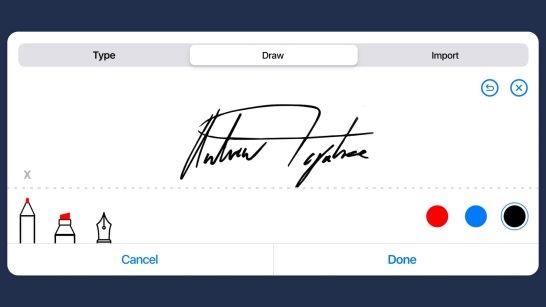
Create a professional-looking cursive signature in seconds with Fill's free online cursive signature generator. Draw your signature using your mouse, touchscreen, or stylus, then download it instantly to use in PDFs, Word documents, emails, and online forms—no scanning or design skills required.
Whether you need a handwritten-style signature for personal documents or business paperwork, Fill makes it easy to create, save, and use your signature whenever you need it.
What Is a Cursive Signature Generator?
A cursive signature generator is an online tool that converts a freehand drawing or typed name into a stylised digital signature resembling handwritten cursive. You draw using a mouse, stylus, or finger, then download or embed the result directly into PDFs, Word documents, or emails.
On top of being a valuable tool for remote signing, it helps make your signatures stand out. The more unique your signatures are, the more difficult it is for fraudsters to replicate them. Plus, you can easily succeed at leaving a lasting impression.
Why Use a Cursive Signature?
A cursive signature gives your documents a more personal and professional look than a typed name. Whether you're signing contracts, forms, invoices, or letters, a handwritten-style signature helps reinforce your identity while making your documents feel more authentic.
Unlike traditional handwritten signatures, a digital cursive signature can be reused whenever you need it. Once you've created your signature, you can quickly add it to PDFs, Word documents, emails, and online forms without printing, signing by hand, or scanning paperwork. This saves time while keeping your signature consistent across every document you sign.
A cursive signature can also be more distinctive than a simple typed signature. While no signature style alone prevents fraud, adding unique characteristics—such as your preferred letterforms, initials, or a consistent flourish—can make your signature easier to recognize and more difficult to imitate than plain text.
Most importantly, choosing a cursive style doesn't affect whether your electronic signature is legally valid. In most countries, including the United States and the European Union, the legality of an electronic signature depends on the signer's intent and the signing process—not whether the signature is written in cursive. A cursive signature simply offers a more familiar, handwritten appearance that many people prefer for both personal and business documents.
Whether you're creating your first digital signature or replacing an old scanned signature, a cursive signature generator makes it easy to create a signature that looks professional, stays consistent, and is ready to use whenever you need it.
Cursive Signature Examples
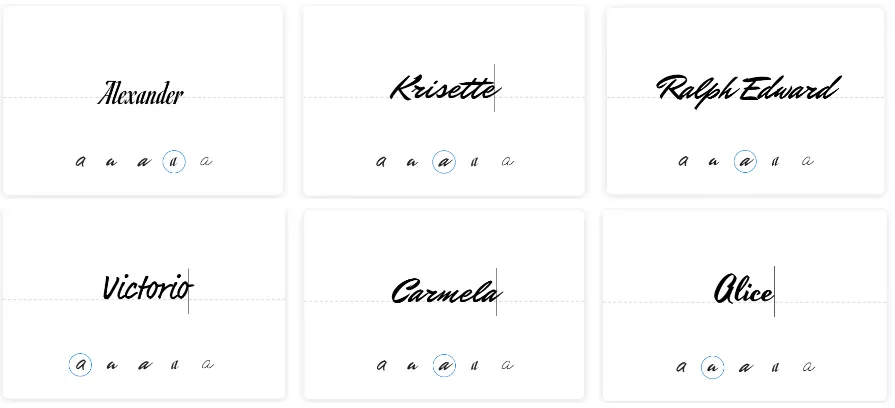
Whether you prefer a simple, elegant signature or something more distinctive, looking at different styles can help you decide what works best for your name. The best cursive signatures are easy to recognize, consistent every time you sign, and unique enough to reflect your personal style.
Browse the examples below for inspiration, but don't feel like you need to copy them exactly. A professional signature doesn't have to be elaborate—it simply needs to be readable enough for identification while remaining difficult for others to imitate.
What Makes a Good Cursive Signature?
A well-designed signature should be:
- Simple enough to write consistently without slowing you down.
- Distinctive enough to reflect your identity, whether through initials, letter shapes, or a subtle flourish.
- Readable without being overly detailed, striking a balance between clarity and uniqueness.
- Professional for everyday use, from business contracts and legal documents to emails and online forms.
Once you've found a style you like, you can create your own digital version in just a few seconds using Fill's free cursive signature generator.
How to Create a Professional Cursive Signature
Your signature is something you'll use for years, so it's worth spending a few minutes creating one that looks professional and is easy to reproduce. Whether you're signing contracts, business documents, or everyday forms, a well-designed signature should be distinctive, consistent, and comfortable to write.
Here are a few tips to help you create a signature you'll be happy using every day.
Keep It Simple
A professional signature doesn't need to include every letter of your name. Many people simplify their signature by emphasizing their first name, last name, or initials while allowing the remaining letters to flow naturally. A cleaner signature is faster to write and easier to reproduce consistently.
Make It Distinctive
Your signature should have at least one feature that makes it recognizable. This could be a unique way of writing a particular letter, a consistent underline, or a subtle flourish at the end. Small personal touches help make your signature feel unique without making it overly complicated.
Focus on Consistency
The best signature isn't necessarily the fanciest—it's the one you can recreate every time. Try to keep the size, slant, spacing, and overall shape similar each time you write it. Consistency makes your signature easier to recognize across different documents.
Don't Overdo the Flourishes
Loops, swirls, and decorative strokes can make a signature look elegant, but too many can reduce readability. Aim for a clean design with just one or two stylish elements rather than covering your signature with elaborate embellishments.
Make Sure It Works Digitally
A signature that looks great on paper should also look good when used electronically. When creating a digital signature, test how it appears at different sizes in PDFs, Word documents, and online forms. Thin lines or excessive detail may become difficult to see when your signature is scaled down.
Practice Before Saving It
Once you've found a style you like, draw it several times before saving your final version. This helps you develop muscle memory and ensures your digital signature matches the one you'll naturally write in the future.
Pro Tip: If you're creating a signature for business or legal documents, choose a style that's professional and easy to recognize rather than overly decorative. A simple, consistent signature is usually more practical than an elaborate one.
How to Create a Cursive Signature Online
Creating a digital cursive signature only takes a few minutes. Whether you simply want to download a signature image or save one for signing documents electronically, you can choose the option that best fits your needs.
Method 1: Create a Free Cursive Signature
If you only need a signature to insert into documents, you can use Fill's free online signature generator—no account required.
- Open the free signature generator.
- Draw your signature using your mouse, touchscreen, or stylus.
- Adjust the pen style and thickness if needed.
- Clear and redraw until you're happy with the result.
- Download your signature and add it to PDFs, Word documents, emails, or online forms.
Method 2: Save Your Signature in Fill
If you regularly sign documents, creating a free Fill account lets you securely save your signature so it's always ready whenever you need it. Instead of uploading the same signature every time, you can insert it into documents with a single click.
To save your signature in Fill:
- Create a Fill account or sign in.
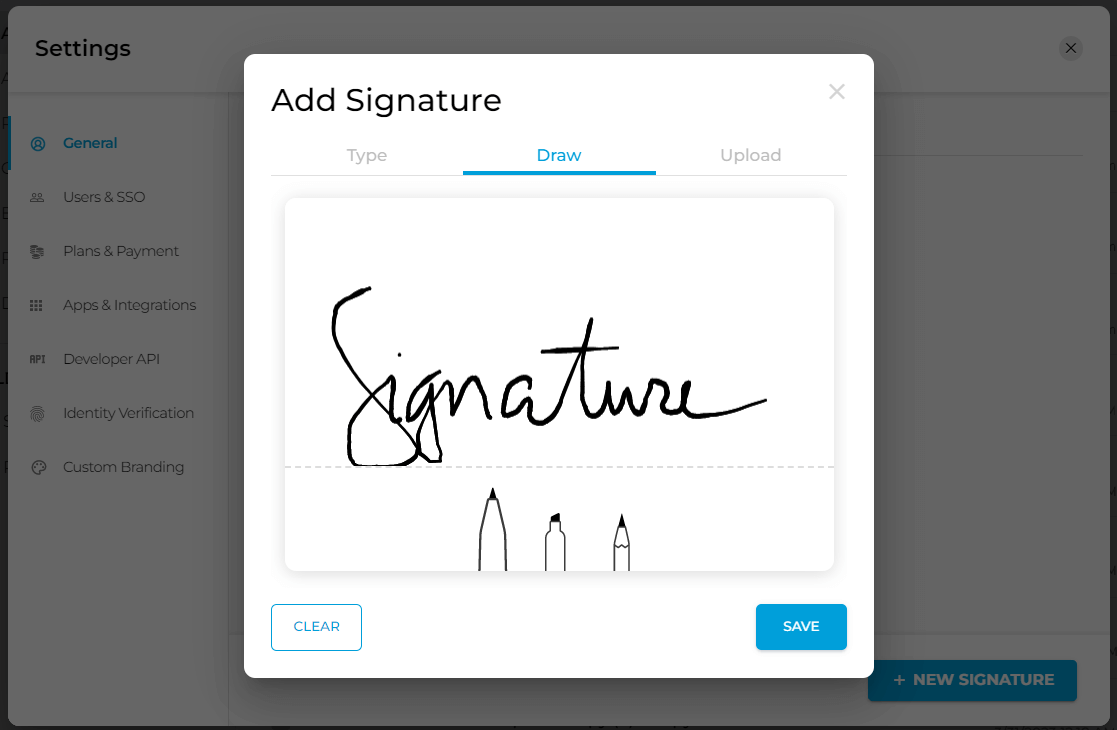
- Open Settings > General > My Signatures.
- Click New Signature.
- Select Draw and create your signature using your mouse, trackpad, touchscreen, or stylus.
- Click Save.
Your saved signature will be available whenever you upload a document, making it quick and easy to sign PDFs, contracts, forms, and agreements without having to recreate your signature each time.
How to Add Your Signature to Documents
Once you've created your digital signature, you can use it across a wide range of documents without printing or scanning paperwork. Whether you're signing a contract, approving a form, or adding a professional touch to your emails, a saved digital signature makes the process quick and consistent.
Add Your Signature to a PDF
With Fill, signing a PDF only takes a few clicks.
- Open Fill in your browser and upload your PDF.
- Click Insert Signature from the toolbar.
- Select your saved signature or create a new one.
- Drag and resize the signature where it belongs.
- Save or download your signed document.
Because your signature is saved to your account, you can insert it into future documents instantly without having to redraw or upload it each time.
Add Your Signature to a Word Document
You can also use your saved signature in Microsoft Word documents. Simply insert your downloaded signature image into the document, resize it to fit the signature line, and save the file. If you're using Fill, you can upload the Word document directly, sign it electronically, and download the completed version when you're finished.
Read Further: How to Add Electronic Signature in Word
Add Your Signature to Emails
A cursive signature can also make your emails look more professional. Most email providers allow you to upload a signature image in your account settings, giving every message a consistent handwritten-style signature without needing to sign each email manually.

Is a Cursive eSignature Legally Binding?
Yes. In most countries, a cursive electronic signature is legally binding as long as it meets the legal requirements for an electronic signature.
In the United States, electronic signatures are recognized under the Electronic Signatures in Global and National Commerce (ESIGN) Act and the Uniform Electronic Transactions Act (UETA). Similar laws exist in many other regions, including the Electronic Communications Act in the UK and the eIDAS Regulation across the European Union.
What matters most isn't whether your signature is written in cursive, but whether you intended to sign the document electronically. A legally enforceable eSignature should also be supported by a secure signing process, including features like signer authentication and an audit trail that records when and how the document was signed.
Whether you draw your signature in cursive, upload an image of your handwritten signature, or type your name, each can be legally valid when used through a compliant electronic signature platform. The style of your signature doesn't determine its legal validity—your intent to sign and the integrity of the signing process do.
Good to know: A typed signature, a drawn cursive signature, or an uploaded image of your handwritten signature can all be legally valid electronic signatures. The signature's style doesn't determine its legal enforceability—your intent to sign and the signing process do.
Frequently Asked Questions
Does your signature have to be in cursive?
No. A signature does not have to be written in cursive to be legally valid. You can use a cursive signature, a printed signature, initials, a typed name, or even an uploaded image of your handwritten signature, provided it meets the legal requirements for an electronic signature in your jurisdiction. Many people choose cursive because it offers a more personal, handwritten appearance.
Can I type my name instead of drawing a signature?
Yes. Many electronic signature platforms allow you to type your name and choose a handwritten-style font instead of drawing your signature. While typed signatures are generally legally valid when used through a compliant eSignature platform, many people prefer drawing their signature because it more closely resembles their handwritten signature.
How do I create a professional-looking cursive signature?
A good cursive signature should be simple, consistent, and easy to reproduce. Focus on creating a signature that reflects your personal style without becoming overly complicated. Small details like a unique letter shape, a slight flourish, or a consistent slant can help make your signature distinctive while keeping it practical for everyday use.
Can I use the same digital signature on every document?
Yes. Once you've created a digital signature, you can reuse it across contracts, forms, invoices, PDFs, Word documents, and other business or personal documents. Using the same signature consistently helps reinforce your identity and creates a more professional appearance.
Can I create a cursive signature on my phone?
Absolutely. Fill's free cursive signature generator works on desktops, tablets, and smartphones. You can draw your signature using your finger, a stylus, or your device's touchscreen, then download it for immediate use.
What's the difference between a wet signature and an electronic signature?
A wet signature is a traditional handwritten signature made with pen and paper. An electronic signature is created and applied digitally. Both can be legally valid, depending on the applicable laws and the signing process used. Electronic signatures eliminate the need to print, sign, and scan documents, making them faster and more convenient for remote signing.
Can I change my signature later?
Yes. Your signature isn't permanently fixed. You can create a new digital signature whenever you want, whether you're updating your personal style, changing your name, or simply creating a cleaner, more professional-looking signature.
Is Fill's cursive signature generator free?
Yes. You can use Fill's free cursive signature generator to create and download a handwritten-style digital signature. If you later need to sign documents online, save signatures for future use, or request signatures from others, you can create a Fill account to access additional eSignature features.
Related Stories
Handwritten Signature Generator: Create a Unique Signature Online

Best Free eSign Software in 2026: Top Picks for Signing Documents Online

How to Send a Document for Electronic Signature