How to Cancel Adobe Acrobat Free Trial Before You Get Charged
If you're nearing the end of your Adobe Acrobat free trial, you'll want to cancel before it automatically renews into a paid subscription. The good news is that you can cancel your trial in just a few minutes from your Adobe account.
This guide walks you through the exact steps to cancel your Adobe Acrobat free trial, explains what happens after cancellation, and answers common questions so you can avoid unexpected charges. If you're looking for a simpler PDF editor afterward, we'll also introduce an alternative worth considering.
How to Cancel Adobe Free Trial
If you no longer need Adobe Acrobat, you can cancel your free trial in just a few minutes from your Adobe account. To avoid being charged, make sure you complete the cancellation process before your trial renewal date.
Step 1: Sign In to Your Adobe Account
Go to https://account.adobe.com/plans and sign in using the Adobe ID you used to start your free trial.
After signing in, you'll be taken to your Adobe account where you can view your active plans and subscriptions.
Tip: If you have multiple Adobe accounts, make sure you're signing in with the same email address you used when you started your Acrobat free trial. Otherwise, your subscription may not appear.
Step 2: Open Your Plan Details
On the Plans page, locate your Adobe Acrobat free trial or active subscription.
Select Manage plan to view your subscription details and available account options.
If you don't immediately see your Acrobat plan, refresh the page or verify that you're signed in to the correct Adobe account.
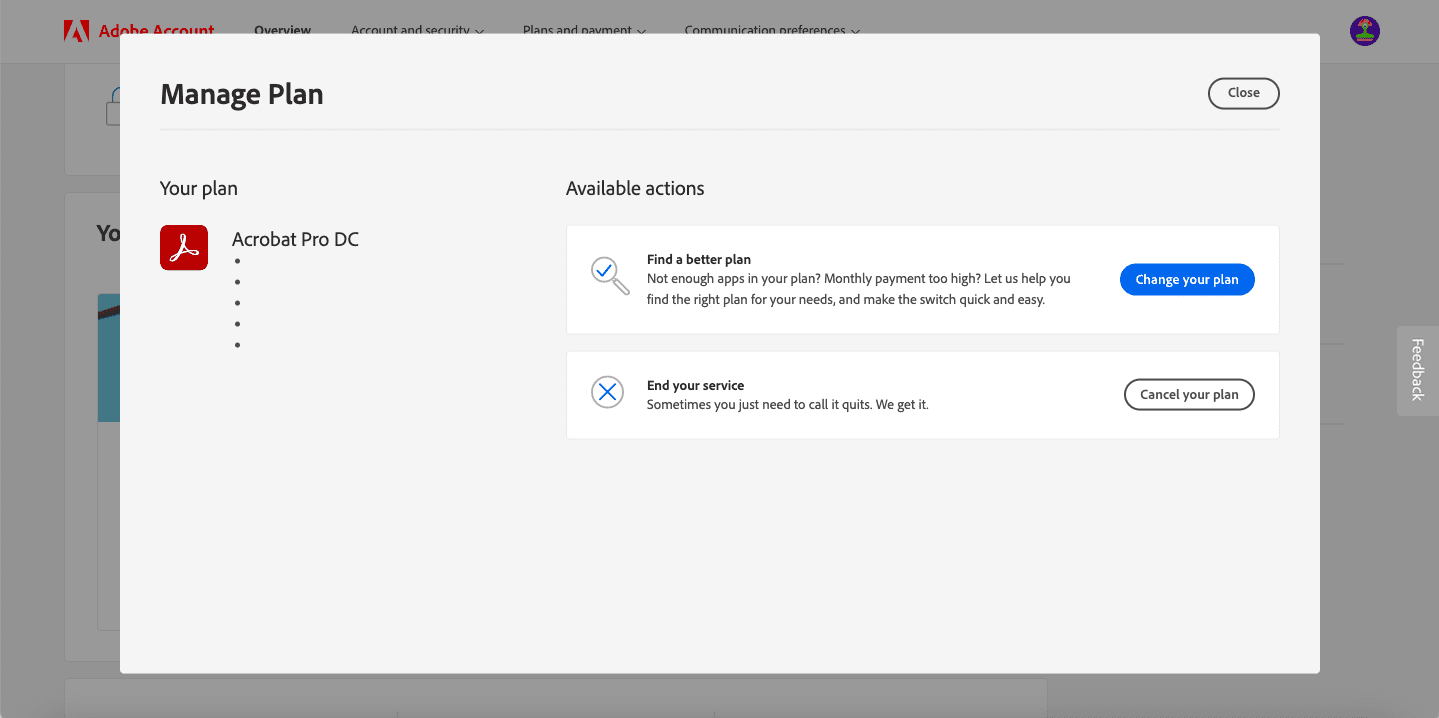
Step 3: Select "Cancel Your Plan"
Within the plan management page, click Cancel your plan.
Adobe will ask you to confirm your decision and may present several options, such as changing your plan or contacting support instead. Continue through the prompts if you're certain you want to cancel your free trial.
During this process, Adobe will also ask why you're canceling. Simply choose the reason that best matches your situation and continue.
Step 4: Confirm the Cancellation
Review the cancellation details and complete the final confirmation.
Once your cancellation has been processed, Adobe should display a confirmation message. In most cases, you'll also receive a confirmation email.
To make sure your free trial has been canceled successfully, return to the Plans section of your Adobe account and verify that your trial is no longer listed as active.
Important: Cancel your Adobe Acrobat free trial before the renewal date shown in your account. Otherwise, your free trial may automatically convert into a paid subscription.
What Happens After You Cancel Your Adobe Acrobat Free Trial?
Once you cancel your Adobe Acrobat free trial, Adobe will display a confirmation message and typically send a confirmation email to the address associated with your account. Keep this email for your records in case you need to verify that your trial was successfully canceled.
Here's what you can expect after canceling:
- You'll keep access until your trial ends. You can continue using Adobe Acrobat's premium features until the end of your free trial period.
- You won't be charged as long as you cancel before your trial renewal date.
- Your files remain in your Adobe account. Canceling your trial doesn't automatically delete your PDF documents or cloud storage.
- Premium features will no longer be available once the trial expires unless you purchase a subscription.
Tip: To make sure your cancellation was successful, sign in to your Adobe account and check the Plans section. If your trial is no longer listed as active and you've received a confirmation email, your cancellation has been completed.
What to Do if You've Already Paid for a Subscription?
If you've already paid for a subscription, there are a few steps you need to take on how to cancel Adobe free trial.
1. Contact Adobe customer service - The easiest way to cancel is to contact Adobe customer service, and they'll help you through the process.
2. Access your account settings - You can also access your account settings and cancel your subscription.
3. Stop automatic renewal - If you don't want to contact Adobe, you can stop automatic renewal, which will prevent you from being charged in the future.
Canceling Adobe software can be confusing, but it's worth it if it's not the right fit for you. There are plenty of other software options available, so take the time to explore and find the best one.
Common Adobe Acrobat Free Trial Cancellation Problems
If you're having trouble canceling your Adobe Acrobat free trial, you're not alone. Here are solutions to some of the most common issues users encounter.
I Can't Find the "Cancel Your Plan" Button
If the Cancel your plan option isn't visible in your Adobe account:
- Make sure you're signed in with the Adobe ID used to start the free trial.
- Go to Plans > Manage Plan instead of the general account dashboard.
- Refresh the page or try signing in using a different browser.
- If the option still doesn't appear, contact Adobe Support for assistance.
Adobe Says "We Can't Verify Your Subscription Status"
This message can appear if Adobe is unable to confirm your account or subscription details.
Try these troubleshooting steps:
- Sign out of your Adobe account and sign back in.
- Confirm you're using the correct Adobe ID.
- Check your internet connection and refresh the page.
- Wait a few minutes and try again if Adobe's services are temporarily unavailable.
- If the issue continues, contact Adobe Support to verify your subscription status.
I Forgot to Cancel My Adobe Free Trial
If your free trial has already renewed into a paid subscription, sign in to your Adobe account as soon as possible and review your plan details.
Depending on your subscription type and when the charge occurred, Adobe may provide cancellation or refund options. Review your account information or contact Adobe Support to learn what options are available for your plan.
Does Adobe Free Trial Automatically Cancel?
No. Adobe Acrobat free trials generally do not cancel automatically. If you don't cancel before the trial period ends, the trial typically converts into a paid subscription.
To avoid unexpected charges, cancel your trial before the renewal date shown in your Adobe account.
Can I Cancel My Adobe Free Trial Anytime?
Yes. You can usually cancel your Adobe Acrobat free trial at any time before the trial expires.
Once your cancellation is confirmed, you'll generally continue to have access to premium features until the end of the free trial period without being charged for the subscription.
Will I Be Charged a Cancellation Fee?
If you're canceling during the free trial period before it renews into a paid subscription, you generally won't be charged a cancellation fee.
If your trial has already converted into a paid plan, cancellation terms may vary depending on your subscription. Review your plan details in your Adobe account or contact Adobe Support if you're unsure about any applicable fees.
Fill vs. Adobe Acrobat: Which PDF Editor Is Right for You?
If you're deciding what to use after canceling Adobe Acrobat, here's a quick comparison of how Fill and Adobe Acrobat differ. Both let you edit PDFs and collect electronic signatures, but they're designed for different types of users.
If your primary needs are editing PDFs, collecting signatures, completing forms, and sending documents for approval, Fill provides those essential tools in one intuitive platform. For many individuals and small businesses, that means less complexity and a faster document workflow than using a full PDF suite.
Frequently Asked Questions
Can I cancel my Adobe free trial at any time?
Yes. Adobe allows you to cancel your free trial before the trial period ends. To avoid being charged, make sure you cancel before the renewal date shown in your account.
Does Adobe free trial automatically cancel?
No. Most Adobe free trials automatically convert into a paid subscription if you do not cancel before the trial period ends. Check your account details to see your trial expiration date.
What happens if I cancel my Adobe free trial?
When you cancel your Adobe free trial, you keep access to the product until the trial period ends. After that, access to premium features is removed unless you purchase a subscription.
Can I cancel Adobe free trial and not get charged?
Yes. If you cancel before the trial expires, you generally won't be charged for the subscription. Be sure to complete the cancellation process and confirm that you receive a cancellation confirmation.
How do I know if my Adobe free trial was successfully canceled?
After canceling, Adobe should display a confirmation message and send a confirmation email. You can also verify your subscription status by checking the Plans section of your Adobe account.

View our Privacy Policy for more info.