Over 1 million satisfied users.
With an average of 4.6 and 4.9-star ratings on Google Play and Apple App Stores, Fill is the best electronic signature platform for individuals and businesses. It’s an eSignature solution trusted by millions of users.

Sign Documents in Seconds

Seamless Document Signing on Android

Secure and reliable

Innovative

Regulation compliant

Easy-to-Use

Affordable and accessible
Customers love it.
Abigail Roberts
Marketer
Ravi
Designer
Brett Thompson
Designer
Annabelle Porter
Developer
Jonathan Wilson
Designer
Anna Souzakis
Cusomter
Frequently Asked Questions
How do I sign documents on my Android device?
Signing documents on your android device is easy when you download an electronic signature application like Fill. Here’s how:
- Download Fill’s electronic signature application on the Play Store.
- Create an account with Fill, or log in if you already have one.
- To upload a document, tap the Plus button at the screen’s bottom center.
- Select the document you wish to sign on your Android device.
- Upload the document to the Fill’s mobile app.
- Edit the document and make any necessary changes.
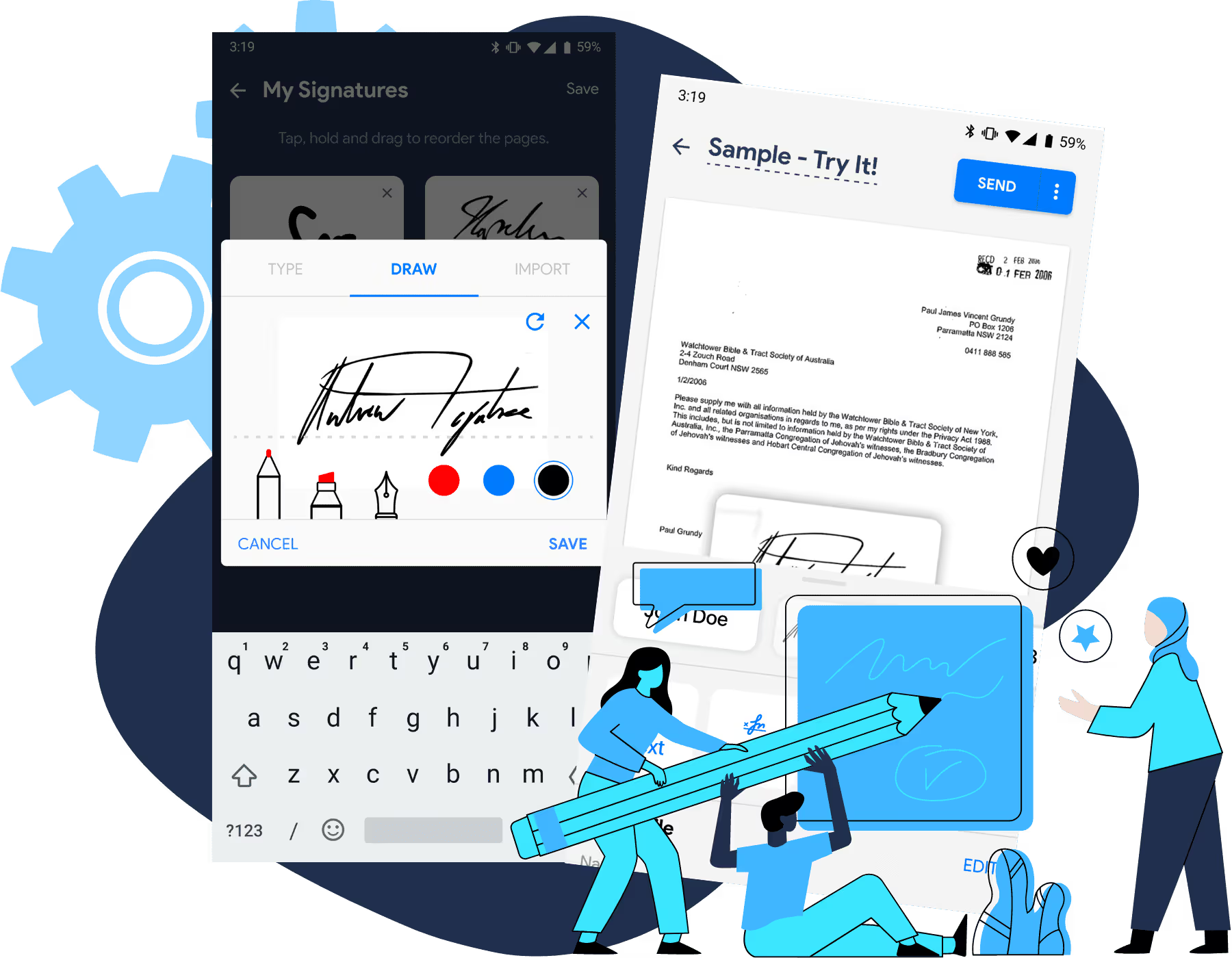
- Select the Sign button in the Edit menu, then tap the Plus (+) button.
- Add your signature using any of the three options: Type, Draw, or Import.
- Tap Done to save the signature in the cloud.
- Drag and drop the electronic signature to the appropriate field.
- Share the document with your contracts by tapping Send in the upper right-hand corner of your phone’s screen.
- You can also export the document to keep a copy for yourself.”
How do I sign documents on my Android device?
Electronic signatures, also known as digital signatures, are a way to sign documents online. In general, electronic signatures are as legally binding as traditional paper-and-ink signatures.
Digital signatures can be used in Android applications just like they can be used on desktop computers. There are a few different ways to sign documents digitally, but the most common method is to use a stylus or your finger to sign on a touch screen.
Signing documents electronically is growing in popularity because it’s more convenient than traditional paper-and-ink signatures. You can sign documents on Android anywhere as long as there’s an Internet connection, and you don’t have to worry about losing or misplacing paper documents.
Electronic signatures also make it easy to track who has signed which documents. Generally, they are a safe and convenient way to sign documents. You can download electronic signature apps for Android on Google Play Store.
You’re probably used to signing documents the old-fashioned way, with a pen and paper. But what about electronic signatures? Are they legally binding?
The short answer is yes! In fact, electronic signatures are just as legally binding as traditional signatures. Electronic signatures have the same legal weight as handwritten signatures or digital signatures. So if you’re asked to sign a document online, you can rest assured that your signature on the phone will be just as binding as if you’d signed it in person.
In 2000, the Electronic Signatures in Global and National Commerce Act, also known as the ESIGN Act, was passed and established the legal validity of electronic signatures.
The ESIGN Act applies to all types of contracts, from consumer agreements to business deals. So if you’re ever asked to sign a document online, you can rest assured that your digital signature on Android will be just as legal and binding as long the elements required under ESIGN Act are present.
Electronic signatures are a great way to get documents signed quickly and easily, without having to print them out and sign them in person. And with Fill, it’s easy to attach electronic signature on Android devices.
Here’s how to sign documents on Android phone:
- Download Fill on Google Play Store and launch it on your mobile phone.
- Open the document that you need to sign. You can import it from Google Drive, Dropbox, Email or scan it on the spot. You can use the Fill app to sign PDF on Android devices.
- Attach your signature – you can sign it using a stylus or finger, or create signature or Android using Fill.
Just tap where you need to sign, and then follow the prompts on the screen. It’s that easy!
You may also share your document and ask others to sign it by filling in the email addresses of the recipients.
With electronic signatures from Fill, you can sign documents quickly and easily – without ever having to print them out.
There are a number of electronic signature apps available for Android, but Fill is the best option for those who need to sign documents digitally. Allow us to justify why it’s the best, aside from what customers are already saying about it.
The app is easy to use and understand, and it’s free to download and install. Fill electronic signatures are legally binding in most countries, so you can rest assured that your documents will be legally valid.
For starters, Fill HQ is incredibly easy to use. Just upload the document you need to sign, add your electronic signature, and that’s it! No muss, no fuss.
Second, Fill HQ is highly secure. Your electronic signatures are backed by 256-bit end-to-end encryption, so you can rest assured that your documents are safe and sound. It’s also HIPAA and GLBA compliant, a feature that most professionals and businesses will appreciate especially when handling sensitive data.
Finally, Fill is FREE FOREVER for those who occasionally need to sign documents online. They can sign and upload unlimited documents. Meanwhile, for those who want to use it for business, Fill offers the most affordable premium plans, the lowest is only $4.17 per month or $49.99 per year. Most of Fill’s competitors charge double for such price.
So if you’re looking for the best electronic signature app for Android, be sure to give Fill HQ a try. We think you’ll be glad you did!