Sign Documents in Seconds

Embrace a modern approach to document signing with Fill’s esign for Mac

Cost-effective

Secure and compliant

Easy-to-use

Portable and convenient

Packed with features
.webp)
Create your electronic signature on your Mac computer
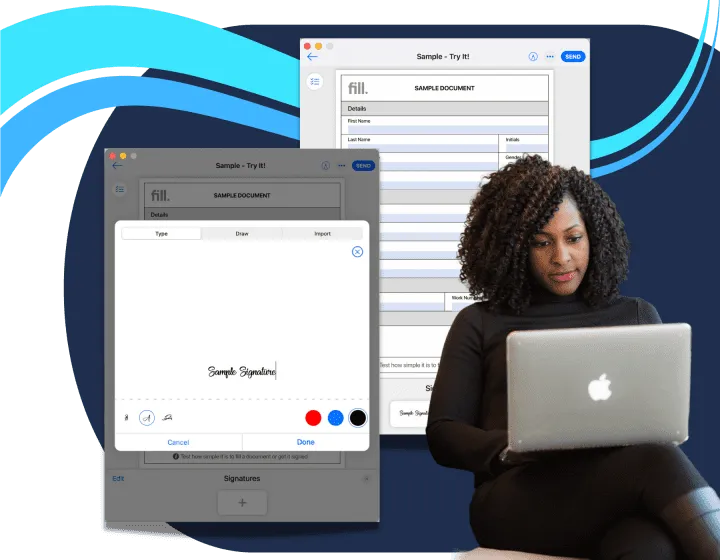
Sign Documents with Ease
Effortlessly sign documents online with our secure, digital signature platform. Streamline your workflow and get agreements finalized faster.
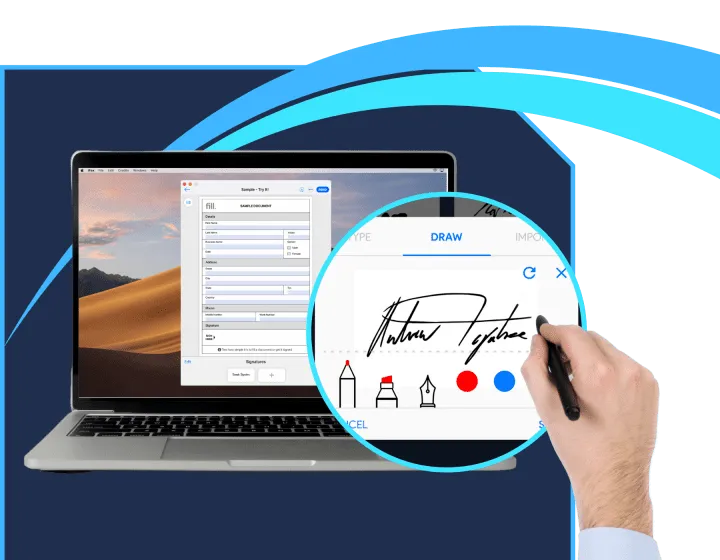
Access 100+ Customizable Templates
Choose from a wide range of professional templates designed for every need. Customize and fill out forms quickly and efficiently.

Request Signatures
Instantly
Easily send documents for signature and track their status in real time. Simplify the approval process and keep everything moving smoothly.

Legally Binding Audit Trail
Ensure every signature and action is tracked with a comprehensive, legally binding audit trail. Maintain full transparency and compliance with detailed records of document interactions.
What our customers say about us.
Abigail Roberts
Marketer
Ravi
Designer
Brett Thompson
Designer
Annabelle Porter
Developer
Jonathan Wilson
Designer
Anna Souzakis
Cusomter
Frequently Asked Questions
How to install Fill esign on Mac?
Fill’s esign app for Mac boasts a modern interface that’s packed with innovative features and functionalities. It allows you to sign documents digitally in a matter of seconds. What’s even better is that you can download the Fill app for free.
Let’s walk through the process:
- On your Mac computer, go to the App Store.
- Log in to your Apple account.
- Type Fill PDF Editor, Signature App on the search bar and press Enter.
- Select Fill PDF Editor, Signature App.
- Alternatively, you can also search for the app here.
- Click Get and then click Install.
- Verify your account by either re-typing your password or using your fingerprint.
- Your Mac computer should automatically install the app once it’s done downloading. The process may take a few minutes to finish.
Once the app has been successfully installed, simply sign in to your account so you can start using Fill.
How to fill in PDF on Mac?
Fill’s esign app for Mac simplifies your document-signing process by completely eliminating the need to print any files. You can do all your transactions digitally within minutes. Aside from being able to sign documents on Mac, you can also fill out PDF files on your computer.
Here’s how to do it:
- Download Fill’s electronic signature application on Mac.
- Launch the application on your computer.
- Create your account with Fill. If you have an existing account, sign in.
- Click the Plus sign button found on the bottom center of the dashboard.
- Select Finder and choose the PDF document you wish to fill in.
- Select Sign Yourself if you’re the only one who needs to sign the document. If there are any other parties involved in the document signing, select Request Signature.
- Click Fill and Sign Document.
- Click Text on the Edit menu, and type in the necessary information.
- You may drag the text box to the appropriate place.
- Once you’re done, click Send.
- Choose between Download PDF, Send to Others, and Fax to complete the process.
How to add/create signature on Mac?
Many thanks to technological advances, it is now possible to sign documents without having to print copies of them. All you need is an electronic signature application like Fill and you can sign and fill out paperwork on the go using only your preferred device such as computers, tablets, and even smart or mobile phones.
When you sign up with Fill, you can access our electronic signature that’s compatible with mobile phones and computers. If you are using Mac computer, you may download and install our desktop application. You can also opt to access Fill our web application using your preferred internet browser.
Once you have created your account, you should be able to start creating your electronic signature on your Mac. To do so, you can either draw your signature using your mouse or trackpad. If you already have a digital copy or an image of your signature, you can also upload it to Fill. For quick signing, you may also just type your signature and choose from our array of fonts that will suit your liking.
How to sign a PDF on Mac?
When sending out documents online for signing, it’s highly recommended to use PDF as your standard format for your files. For one, it’s extremely portable, which means anyone you share your files with can open them regardless of the device or platform they are using. PDF files are also very compact. Most importantly, you can password protect your documents to prevent unauthorized access.
Signing PDF files on Mac is fairly simple. The first thing that you need to do is find a trusted electronic signature application to help simplify the signing process. We highly recommend using Fill. When you sign up with Fill, you can download our free desktop application for your Mac computer, or you can simply go to our website to access your account. We pride ourselves on having a sleek and simple interface that’s very easy to use and navigate.
Simply upload your PDF document to Fill. To sign a PDF on Mac using Fill, click Insert Signature. You can either draw your signature using your mouse, type your signature, or upload a digital copy of your signature. Then click Done.
What is the best PDF signature app on Mac?
In recent years, there has been a significant increase in organizations switching to digital or electronic solutions, especially in terms of signing documents and filling out paperwork. In that light, it is not surprising that many companies have come out offering electronic signature applications and solutions. The number of choices is quite overwhelming.
So what makes Fill one of the best PDF signature apps on Mac? One of the things that make Fill a standout electronic signature app is that it is incredibly easy to use. Our signing process is pretty straightforward. Even those with the least amount of computer experience will not have a hard time figuring out how to create signature on Mac and how to sign documents on Mac.
Moreover, we offer competitive pricing plans that will help you get more value for your money. With plans starting at $4.17 a month, you can already enjoy our top-rated features. And finally, with Fill, your data is safe and protected. We only use the highest level of security measures to eliminate any threats of unauthorized access, forgery, and document alteration and manipulation.